
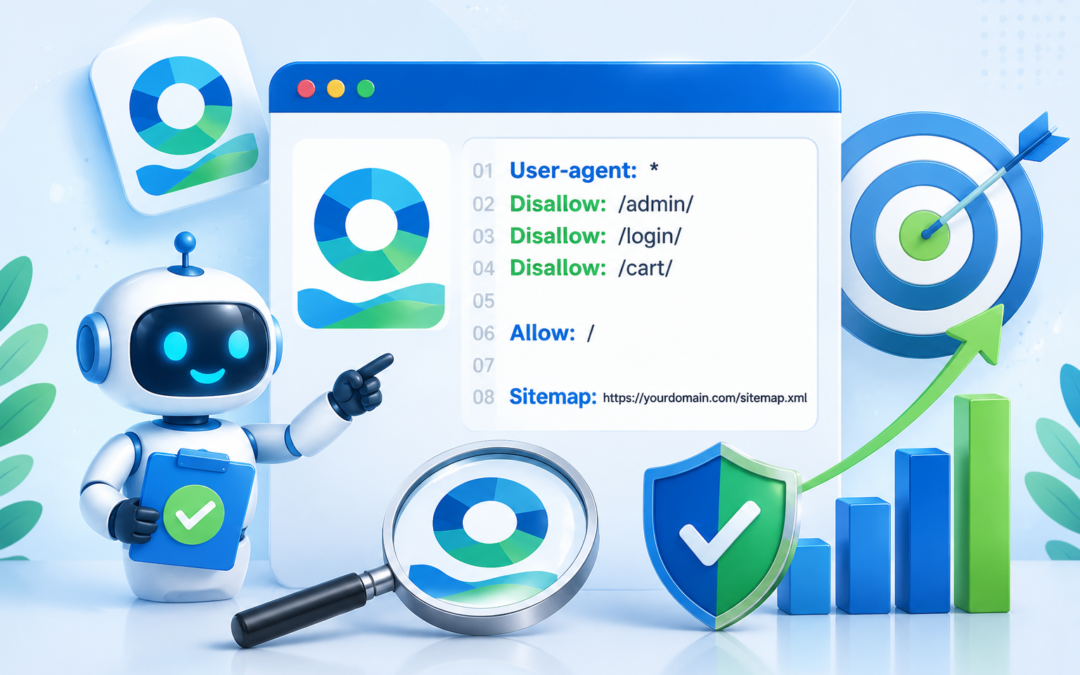
A robots.txt file is a small but important text file that tells search engine crawlers which parts of your website they may or may not crawl. If you have ever wondered what should a robots.txt file look like, the simple answer is this: it should be clear, minimal, accurate, and written for the real structure of your website. A good robots.txt file helps search engines use their crawl budget wisely, avoid duplicate or low-value areas, and find important content more efficiently. A bad one can accidentally block pages you want indexed or expose private-looking folders without truly protecting them. In this guide, you will learn what a robots.txt file does, how it is structured, what common rules mean, how to write practical examples, and which mistakes to avoid before publishing it.
What A Robots.txt File Does
A robots.txt file gives crawling instructions to bots before they request pages from your site. It does not guarantee indexing control, but it strongly influences how well-behaved search engines access your content.
1. It Guides Search Engine Crawlers
The main purpose of robots.txt is to guide crawlers toward or away from specific areas of a website. For example, you may allow product pages while blocking search result pages, filter combinations, cart pages, or staging folders that do not help users from search.
2. It Helps Manage Crawl Budget
Large websites often have thousands or millions of URLs. A clean robots.txt file can help search engines spend less time crawling low-value pages and more time discovering important pages, updated content, category pages, and resources that deserve visibility in search results.
3. It Reduces Crawling Of Duplicate Areas
Many websites generate duplicate URLs through filters, tracking parameters, internal search pages, or printer-friendly versions. Robots.txt can reduce crawler access to these areas, which helps keep crawl activity focused and may reduce confusion around duplicate or thin content.
4. It Does Not Hide Sensitive Information
A robots.txt file is publicly visible, so it should never be used as a security tool. If you list private directories in it, people may still see those paths. Sensitive files should be protected with authentication, server rules, or proper access controls instead.
5. It Works Before Crawling
Robots.txt is checked before a crawler requests other URLs on the site. That makes it different from page-level directives, which are only seen after a crawler accesses a page. This distinction matters when choosing between blocking crawling and controlling indexing.
6. It Supports Multiple Bot Rules
You can write rules for all bots or for specific crawlers. This is useful when you want major search engines to access your site normally but need to limit aggressive crawlers, SEO tools, or nonessential bots that create server load.
What A Robots.txt File Should Look Like
A good robots.txt file is usually short. It uses simple groups of instructions, each beginning with a user-agent line and followed by allow or disallow rules.
1. Start With A User Agent
The user-agent line identifies which crawler the rule applies to. A wildcard user agent applies to all crawlers that respect the protocol. Specific crawler names can be used when you need different rules for different bots, but most websites can start with global rules.
2. Use Disallow For Blocked Paths
The disallow directive tells crawlers which paths should not be crawled. A disallow rule should point to a directory or URL path, not a vague description. Keep it precise, because one broad rule can block far more than intended.
3. Use Allow For Exceptions
The allow directive can open a specific file or folder inside a broader blocked area. This is helpful when a directory contains mixed content, such as blocked scripts but one important resource that search engines need for rendering or understanding a page.
4. Keep Rules In Logical Groups
Robots.txt is easier to maintain when related rules sit together. Put general rules in one group, bot-specific rules in another, and sitemap information near the end. Avoid scattering similar instructions throughout the file, because that makes future edits risky.
5. Add Sitemap Information When Useful
Many site owners include sitemap location information in robots.txt. This can help crawlers find XML sitemaps more easily, especially on larger websites. The sitemap line should point to the sitemap location, but avoid using it as a substitute for clean internal linking.
6. Keep The File Plain And Clean
The file should be plain text, easy to read, and free from unnecessary formatting. Do not add HTML, styling, comments that create confusion, or long explanations. A robots.txt file is for crawlers first and humans second, so clarity matters most.
Basic Robots.txt Syntax
The syntax is simple, but small mistakes can create large SEO problems. These core elements appear in most practical robots.txt files.
- User-Agent: Defines which crawler or group of crawlers the following rules apply to.
- Disallow: Tells crawlers not to crawl a specific path or directory.
- Allow: Creates an exception that permits crawling inside a blocked path.
- Sitemap: Points crawlers toward the site’s XML sitemap location.
- Comments: Optional notes can be added carefully, but they should not clutter the file.
How To Create A Robots.txt File
Creating a robots.txt file is not difficult, but it should be done with care. The safest process starts with your site structure and ends with testing.
- Review Your Website Structure: Identify public pages, private areas, duplicate paths, search pages, admin folders, and system-generated URLs.
- Decide What Should Be Crawled: Prioritize pages that help search users, such as articles, products, services, categories, and important resources.
- Decide What Should Be Blocked: Block areas that waste crawl budget, such as internal search results, carts, checkout flows, or temporary folders.
- Write Simple Rules: Start with the fewest rules needed. Clear and short files are easier to audit than complicated files with many overlapping directives.
- Add Sitemap Details: Include sitemap information if your site has an XML sitemap and you want crawlers to discover it quickly.
- Test Before Publishing: Use a robots.txt testing tool or search console feature to confirm that important pages are allowed and low-value areas are blocked.
- Monitor After Changes: Watch crawl reports, indexing changes, and organic traffic after publishing. Robots.txt changes can affect discovery, rendering, and crawl patterns.
Examples Of Robots.txt Files
Examples help show what a robots.txt file can look like in real situations. The right version depends on your website type, platform, and SEO goals.
1. Simple Website Example
A small business website may only need to allow all important pages and include a sitemap reference. This type of robots.txt file should be very short because unnecessary restrictions can create problems where none existed. Simple websites usually benefit from openness.
2. Blog Website Example
A blog may allow article pages, category pages, and important media while blocking login areas, admin paths, and internal search result pages. The goal is to let crawlers discover helpful content without wasting time on pages that do not satisfy search intent.
3. Ecommerce Website Example
An ecommerce robots.txt file often needs more care because stores create filter URLs, cart pages, checkout pages, wishlists, and account areas. Blocking crawl traps can help, but product and category pages must remain accessible so search engines can discover inventory.
4. WordPress Website Example
A WordPress site commonly blocks administrative paths while allowing files needed for rendering. Modern search engines need access to style, script, and image resources, so blocking too many system folders may prevent accurate page rendering and harm SEO analysis.
5. Staging Website Example
A staging website should not rely only on robots.txt. While you may block all crawlers during development, the safer approach is password protection or server-level access control. Robots.txt is public and cooperative, so it is not enough for private environments.
6. Large Publisher Example
A large publisher may use robots.txt to manage archives, tag combinations, search pages, and parameter-heavy URLs. Because content volume is high, the file should be reviewed regularly with crawl data to ensure valuable articles remain accessible and low-value paths stay controlled.
Common Robots.txt Mistakes To Avoid
Robots.txt mistakes can quietly damage SEO because they affect how crawlers access your site. Always review rules before publishing changes.
1. Blocking The Whole Website By Accident
The most serious mistake is accidentally blocking every crawler from the entire website. This can happen during a redesign, migration, or staging launch. If the rule stays live, search engines may stop crawling important pages, which can reduce visibility over time.
2. Blocking Important Resources
Some site owners block JavaScript, CSS, images, or theme files because they look technical. Search engines often need those resources to render pages correctly. If they cannot see the page like a user does, they may misunderstand layout, content, or mobile usability.
3. Using Robots.txt For Security
Robots.txt does not protect private data. It only asks compliant bots not to crawl listed paths. Anyone can view the file and see the blocked locations, so confidential files, customer information, admin tools, and development areas need real access protection.
4. Confusing Crawling With Indexing
Blocking a page in robots.txt prevents crawling, but it does not always guarantee removal from search results. If other pages link to that URL, search engines may still know it exists. Indexing control often requires page-level directives or removal tools.
5. Writing Rules That Are Too Broad
A broad disallow rule can block more than expected, especially when folder names overlap. Before publishing, check whether the path also affects product pages, article URLs, media files, or important templates. Precision is better than quick guesses.
6. Forgetting To Update After A Redesign
Website structures change during redesigns, migrations, and platform moves. Old robots.txt rules can become inaccurate after URLs, folders, or templates change. Every major launch should include a robots.txt audit as part of the SEO quality review.
Best Practices For Robots.txt Files
The best robots.txt file is not the most complex one. It is the one that clearly supports crawling, indexing, and site maintenance.
1. Keep The File As Simple As Possible
Simple robots.txt files are easier to understand, test, and maintain. Add rules only when there is a clear reason. If a page can be handled with canonical tags, noindex directives, or better internal linking, robots.txt may not be the right first solution.
2. Test Rules Before Launch
Testing helps confirm that crawlers can access important URLs and cannot access blocked paths. This is especially important before site migrations, redesigns, and ecommerce updates. One small syntax issue can affect thousands of URLs on a large site.
3. Allow Rendering Resources
Search engines need access to key page resources to understand what users see. Allowing essential CSS, JavaScript, images, and layout files helps crawlers evaluate mobile friendliness, content placement, navigation, and page experience more accurately.
4. Use Specific Paths
Specific rules reduce accidental blocking. Instead of blocking a broad folder because it contains some low-value pages, consider whether narrower paths can solve the issue. This keeps valuable pages available while still controlling crawl waste.
5. Review Crawl Data Regularly
Robots.txt should not be set once and forgotten. Review crawl reports, blocked URL patterns, server logs, and indexing data periodically. If search engines are missing important content or spending time on useless URLs, your rules may need adjustment.
6. Coordinate With Other SEO Controls
Robots.txt works best when it supports canonical tags, sitemaps, internal links, redirects, and page-level index controls. Treat it as one part of technical SEO, not a complete solution for every crawl and indexation problem.
Key Robots.txt Factors
Several factors determine whether a robots.txt file is helpful or harmful. Before making changes, review these areas carefully.
- Site Size: Larger sites usually need more crawl management than smaller websites with only a few important pages.
- URL Parameters: Filters, sorting, tracking, and search parameters can create crawl waste if they generate many duplicate URLs.
- Platform Structure: Content management systems and ecommerce platforms often create system folders that should be reviewed before blocking.
- Rendering Needs: Search engines may need scripts, styles, and images to understand the page properly.
- Indexing Goals: Robots.txt should support your indexing strategy, not replace noindex, canonical, or redirect decisions.
Practical Robots.txt Use Cases
Robots.txt becomes easier to understand when you connect it to real website situations. These use cases show where it often helps.
1. Blocking Internal Search Results
Internal search pages often create thin, duplicate, or low-quality URLs. Blocking them can prevent crawlers from wasting time on endless query combinations. This is especially useful when a site search feature generates many result pages with little unique content.
2. Managing Ecommerce Filters
Product filters can create thousands of URL combinations based on color, size, brand, price, and sorting. Robots.txt may help control crawling of unimportant combinations, while important category and product pages remain open for discovery and ranking.
3. Protecting Crawl Budget On Large Sites
News sites, marketplaces, directories, and forums can produce huge URL volumes. Robots.txt can guide crawlers away from archives, parameters, or low-value paths so they can focus on fresh, useful, and commercially important content.
4. Preventing Crawling Of Checkout Pages
Cart, checkout, payment, and account pages usually do not need organic search visibility. Blocking crawler access to these areas can reduce unnecessary requests and keep search engines focused on pages that help visitors before conversion.
5. Controlling Bot Access During Testing
During development, teams may use robots.txt to discourage crawling of temporary environments. However, this should be paired with authentication for real protection. Robots.txt can reduce accidental crawler activity, but it cannot secure a test site.
6. Reducing Low-Value Media Crawling
Some sites generate many resized images, previews, or temporary media files. Robots.txt can help control crawler access to low-value media paths, while still allowing important images that support articles, products, and visual search opportunities.
Advanced Robots.txt Tips
Once you know the basics, advanced robots.txt decisions should be based on evidence, not assumptions. Use crawl data and SEO goals to guide refinements.
1. Compare Rules With Server Logs
Server logs show how bots actually crawl your website. By comparing log data with robots.txt rules, you can see whether important pages are being requested, whether blocked areas are still attracting bots, and whether crawl budget is being used efficiently.
2. Avoid Blocking Pages That Need Noindex
If a crawler cannot access a page, it may not see a noindex directive placed on that page. When you need a page removed from search results, consider whether allowing crawl with noindex is more appropriate than blocking it in robots.txt.
3. Review Rules After Platform Updates
Plugins, themes, ecommerce modules, and content management updates can change URL patterns. A rule that was safe last year may become harmful after a platform update. Review robots.txt after major technical changes to avoid outdated assumptions.
4. Use Separate Rules Only When Needed
Bot-specific rules are useful, but they also add complexity. If one global group works for your site, keep it global. Separate crawler groups should be reserved for clear cases, such as limiting a known bot or managing different crawler behavior.
5. Keep Important Pages Internally Linked
Robots.txt can point crawlers away from poor areas, but it cannot replace strong site architecture. Important pages should still be reachable through internal links, navigation, XML sitemaps, and clean URL structures so crawlers can discover them naturally.
6. Document Why Rules Exist
Teams change, websites evolve, and old rules become mysterious. Keep a separate internal note explaining why each important robots.txt rule exists. This makes future audits easier and helps prevent someone from deleting a useful rule or keeping a harmful one.
Robots.txt File Checklist
Use this checklist before publishing or updating your robots.txt file. It helps catch problems that can affect crawling and SEO performance.
- Check Important Pages: Confirm that articles, products, services, categories, and landing pages are not accidentally blocked.
- Check Technical Resources: Make sure essential scripts, styles, images, and rendering files remain accessible to crawlers.
- Check Blocked Paths: Review every disallow rule and confirm it targets only the intended low-value area.
- Check Sitemap Details: Include sitemap information when useful and make sure the sitemap itself is accessible.
- Check After Launch: Monitor crawl reports and indexing signals after publishing changes to catch unexpected effects quickly.
Frequently Asked Questions
1. What Should A Robots.txt File Look Like For A Small Website?
For a small website, a robots.txt file should usually be short and simple. It may allow all crawlers, block only admin or login areas, and include sitemap information. Avoid adding many rules unless you have a clear crawl problem to solve.
2. Can Robots.txt Remove A Page From Google?
Robots.txt controls crawling, not guaranteed removal from search results. If a URL is blocked but linked elsewhere, search engines may still know it exists. For removal or index control, page-level noindex instructions or proper removal processes are often more suitable.
3. Where Should The Robots.txt File Be Placed?
The robots.txt file should be placed at the root of the website so crawlers can find it before exploring other pages. If it is placed in another folder, standard crawlers may not treat it as the official robots.txt file for the site.
4. Should Every Website Have A Robots.txt File?
Most websites should have one, even if it only contains simple allow rules and sitemap information. A missing file is not always disastrous, but having a clean robots.txt file gives you clearer control over crawler guidance and reduces avoidable confusion.
5. Is Robots.txt The Same As Noindex?
No. Robots.txt tells crawlers whether they should access a path, while noindex tells search engines not to include a page in search results after crawling it. They solve different problems and should be chosen based on the desired outcome.
6. How Often Should Robots.txt Be Reviewed?
Review robots.txt after redesigns, migrations, platform updates, SEO audits, or major content changes. For larger websites, periodic reviews are useful because URL patterns, crawl behavior, and indexing priorities can change as the site grows and evolves.
Conclusion
A good robots.txt file should look simple, intentional, and aligned with your SEO goals. It should guide crawlers toward valuable content, limit access to low-value paths, keep important resources open, and avoid broad rules that create accidental crawling problems.
The best approach is to write only the rules you truly need, test them carefully, and review them whenever your website changes. Robots.txt is a small file, but when it is handled well, it supports cleaner crawling and stronger technical SEO.